MacBook Pro vs. MacBook Air Rental: Which Should You Choose for Your Event?

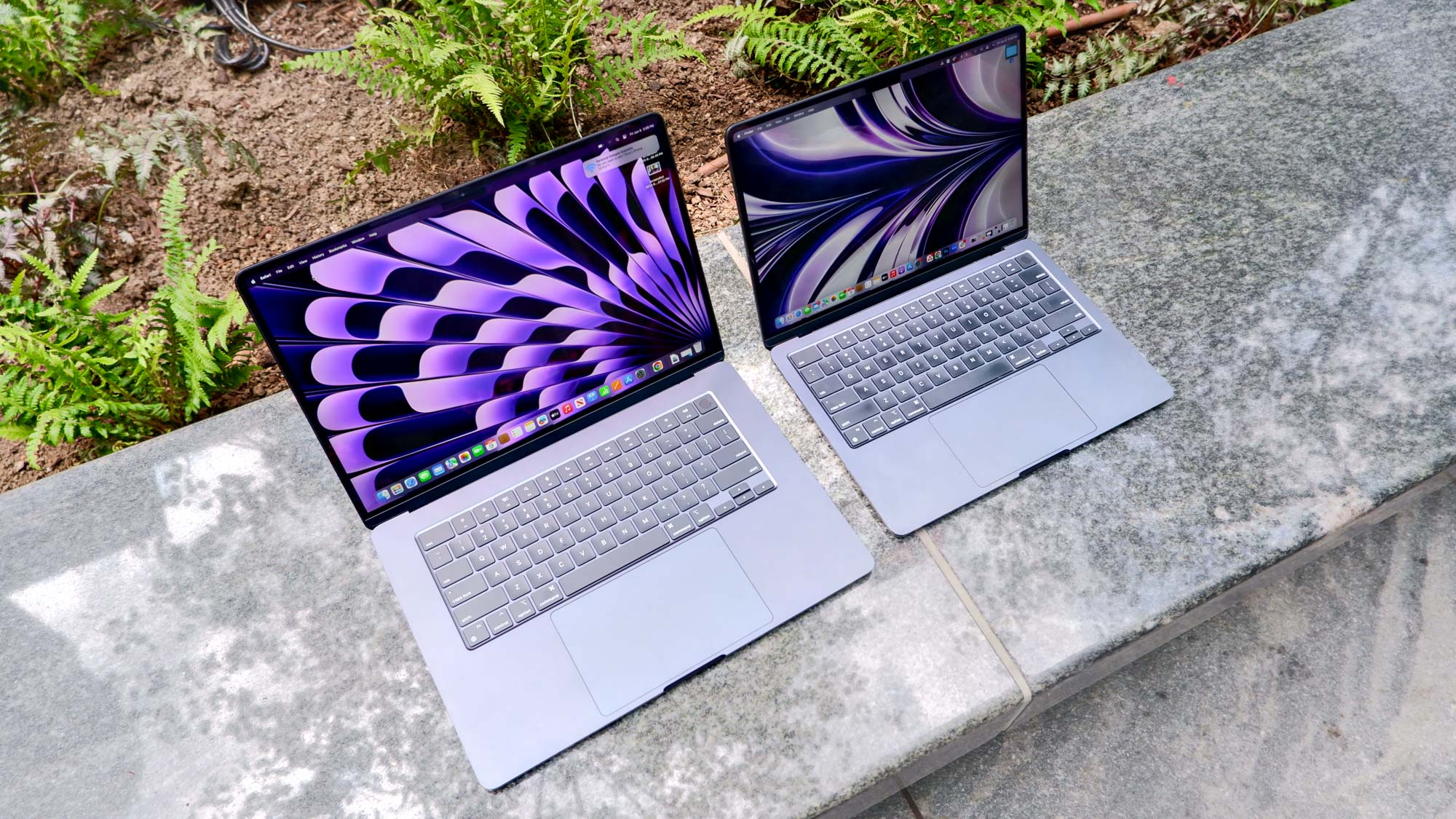
For most events, the MacBook Air is the smarter rental choice. It is lightweight, reliable, and handles the majority of event workloads without any trouble. Go with the MacBook Pro if your event involves video production, graphic-intensive presentations, or sustained high-performance tasks over long periods.
Choosing between a MacBook Air and MacBook Pro for your event rental comes down to what you actually need the machines to do. Both are excellent computers. But renting the wrong one can leave you either overspending on power you do not use, or struggling with a machine that cannot keep up. Whether you are coordinating a macbook rental for a corporate conference, a creative workshop, or a trade show, this guide will help you make the right call.
Let’s start with the basics and work through the practical differences that actually matter on event day.
Understanding the Core Difference
The MacBook Air and MacBook Pro are built around different priorities. Apple designed the Air for portability and everyday efficiency. The Pro exists for people who need sustained, high-level performance over extended periods.
In event settings, that distinction matters a lot. A registration desk running a browser and a spreadsheet has completely different needs from a video editing suite at a media production event.
MacBook Air: The Everyday Workhorse
The current MacBook Air (M2 and M3 chips) handles email, web browsing, Google Workspace, Microsoft Office, Zoom calls, registration software, and light creative work without breaking a sweat.
It is fanless, which means it runs silently. At events where ambient noise matters, that is genuinely useful. It is also lighter and thinner than the Pro, which makes setup and breakdown faster when you are moving units across a venue.
MacBook Pro: Built for Heavy Lifting
The MacBook Pro (M3 and M4 chips) includes active cooling, a brighter display, more ports, and the ability to sustain peak performance for hours. Unlike the Air, it does not throttle under load.
That matters if attendees will be running demanding software continuously. A MacBook Air can handle short bursts of intensive work, but under prolonged pressure it will slow down. The Pro will not.
MacBook Air vs. MacBook Pro: At a Glance
Here is how the two compare across the factors that matter most at events:
| Feature | MacBook Air (M2/M3) | MacBook Pro (M3/M4) | Best For |
| Weight | 1.24 kg | 1.55 kg (14″) | Air for portability |
| Battery Life | Up to 18 hrs | Up to 22 hrs (14″) | Pro for all-day use |
| Display | 13.6″ Liquid Retina | 14″/16″ Liquid Retina XDR | Pro for presentations |
| Ports | 2x USB-C / MagSafe | 3x Thunderbolt + HDMI + SD | Pro for AV setups |
| Fan / Cooling | Fanless | Active cooling | Pro for heavy tasks |
| Performance | Excellent for everyday | Sustained high-load perf. | Pro for video/design |
| Bulk Rental Value | More cost-effective | Higher spec, higher tier | Air for large events |
When to Rent MacBook Air Units for Your Event
The MacBook Air covers the vast majority of event scenarios well. If your attendees are doing any of the following, the Air is likely the right call:
- Checking in, registering, or completing forms
- Running presentations in Keynote, PowerPoint, or Google Slides
- Video calling via Zoom, Teams, or Google Meet
- Web-based platforms, training portals, or e-learning tools
- Standard office productivity work
For bulk MacBook rental orders across large conferences, the Air also makes more financial sense. You get excellent performance across the board, and the per-unit difference adds up quickly when you are equipping 20, 50, or 100 stations.
Good Fit: Corporate Conferences and Training Days
Training events, seminars, and corporate away-days usually involve participants working through slides, software demos, or online courses. The MacBook Air handles all of that well throughout a full day.
Its battery life (up to 18 hours under typical use) means it is unlikely to need charging mid-session, which removes one logistical headache from your setup.
When to Rent MacBook Pro Units for Your Event
The MacBook Pro earns its place when the workload is genuinely demanding. There are specific event types where it is clearly the better option:
- Video editing suites at film festivals or media production events
- Design workshops using Figma, Adobe Creative Cloud, or DaVinci Resolve
- Developer hackathons running compilers, local servers, or VMs
- High-resolution display requirements with colour-critical work
The 16-inch MacBook Pro also has an HDMI port and SD card slot built in, which simplifies AV connections at events without needing adapters. That alone can save time during a complex multi-screen setup.
When MacBook Pro Rental for Events Makes Sense
If you are running a creative industry event, a production studio day, or a technical bootcamp, MacBook Pro rental for events gives your attendees the headroom they need. Struggling with a slow machine mid-task is frustrating, and for professional attendees it reflects on your organisation.
When spec and reliability matter, working with an experienced provider makes a real difference. The Tekk Group has experience supplying MacBooks for events of all sizes and can advise on which model suits your specific setup, software, and schedule.
Practical Considerations for Event Planners
1.How Many Units Do You Need?
For anything above 10 units, logistics start to matter as much as spec. Think about setup time, cable management, charging, and software configuration. The MacBook Air’s lighter form makes it faster to stage in bulk.
If you need to pre-install software or configure accounts across many machines, confirm this with your rental provider in advance. Good providers will handle that for you before delivery.
2. Do You Need macOS Specifically?
Some events specify Mac hardware because the software being demonstrated or used is Mac-only. Others choose Macs because of their reputation for reliability and the preference of attendees.
If your event involves iOS or macOS app demos, or software that simply performs better on Apple Silicon, the Mac choice is already made for you. The question then is which Mac.
3. Software and Compatibility
Check that the software your event needs runs on the macOS version installed on the rental units. This is particularly important for industry-specific tools in architecture, medicine, or finance where version compatibility can be strict.
When you rent a MacBook for business events, your rental provider should be able to specify which macOS version the machines are running and whether updates can be applied prior to your event.
Port and Connectivity: A Practical Note
One often-overlooked difference is connectivity. The MacBook Air (M2/M3) has two Thunderbolt/USB-4 ports and a MagSafe charging port. The MacBook Pro adds a third Thunderbolt port, a full-size HDMI 2.1 port, and an SD card slot.
For events with external monitors, projectors, or AV equipment, the Pro saves you from needing hubs or adapters at every station. In a venue with 30 desks, that is a meaningful logistical difference.
If you are running a simpler setup where delegates just need internet access and a keyboard, the Air’s ports are more than sufficient. Most USB-C peripherals and adapters work fine.
Display Quality: Does It Matter for Your Event?
The MacBook Pro’s Liquid Retina XDR display is noticeably brighter and has a wider colour gamut than the Air’s standard Liquid Retina panel. For colour-critical design work, photography, or video review, that matters.
For general use, most people will not notice the difference day-to-day. If your event involves reviewing visual assets where accurate colour reproduction is required, the Pro display is worth having.
Both screens are excellent by any reasonable standard. The Pro is simply better at the high end.
Battery Life and Power Management at Events
Battery life is one area where both models impress, but the MacBook Pro (especially the 14-inch M3) edges ahead under sustained load. The Air achieves better battery figures in light use but can deplete faster under pressure.
At full-day events, plan for charging access regardless of model. Relying on battery alone for an 8-hour event is risky. Confirm that your venue has adequate power sockets or arrange charging stations.
If you know power access will be limited, the MacBook Air’s fanless design means it runs cooler at moderate load, which helps battery longevity over a long session.
Final Verdict: Which One Do You Actually Need?
For most events, the MacBook Air is the right answer. It is capable, quiet, light, and delivers reliable performance across the full range of typical event workloads. For high volume orders, it is also the more practical choice.
Choose the MacBook Pro when your event genuinely demands sustained performance: heavy creative software, video work, or development environments that push hardware continuously. The Pro handles those scenarios without any compromise.
If you are not sure which way to go, talk to your rental provider. A good one will ask the right questions about your software, your setup, and your attendee count, and point you in the right direction without overselling.
For events across the UK, The Tekk Group is a trusted source for MacBook and laptop hire. They have supplied technology for corporate events, exhibitions, training days, and large-scale conferences, and their team knows what works in practice, not just on paper.
Frequently Asked Questions
1. What is the main difference between MacBook Air and MacBook Pro for event rentals?
The MacBook Air is lighter, fanless, and suited to standard productivity tasks. The MacBook Pro has active cooling, more ports, a better display, and is built for sustained high-performance workloads. For most events, the Air is sufficient.
2. Is the MacBook Air good enough for a corporate conference?
Yes. Presentations, video calls, web apps, and standard office software all run well on the MacBook Air M2 or M3. It handles full conference-day workloads without issue.
3. When should I specifically choose MacBook Pro rental for events?
Choose the MacBook Pro for video editing, graphic design workshops, developer events, or any scenario where multiple demanding applications will run continuously over several hours.
4. Can I rent MacBooks in bulk for a large event?
Yes. Specialist rental providers can supply large quantities of MacBooks, pre-configured with your required software and settings. MacBook Air units are generally more practical for bulk orders due to their size and weight.
5. Do rental MacBooks come with the software I need pre-installed?
This depends on the provider. Reputable rental companies will work with you ahead of the event to install and configure software on the machines before they are delivered.
6. How far in advance should I book MacBook rental for events?
For large orders, booking at least two to four weeks in advance is advisable. This gives the provider time to prepare, configure, and test the machines. Popular event dates book up quickly.
7. What macOS version will rental MacBooks run?
Ask your provider. Rental units are typically maintained on a recent stable macOS release. If you have a specific version requirement due to software compatibility, communicate this clearly when booking.
8. Is there a difference in screen quality between the Air and Pro?
Yes. The MacBook Pro has a Liquid Retina XDR display with higher brightness and wider colour range. For most event tasks it makes no practical difference, but for colour-critical design or photography work, the Pro display is noticeably better.