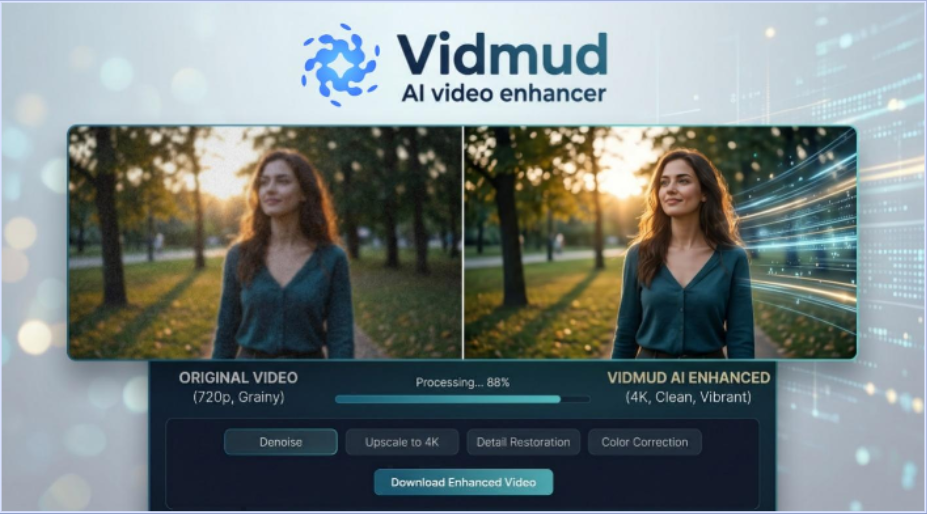
Creating engaging content online involves a number of factors, including video quality. From uploading videos on social media to making videos for YouTube, recording online classes, or capturing personal memories, visuals can make a significant impact. Unfortunately, there are lots of videos with visual noise, particularly those taken in low-light or on older devices.
Video noise is the presence of unwanted grain, flickering dots, or blurry textures that detract from the quality of a video. The process of cutting out noise from videos was only possible with professional editing software and expertise in the past. These tools are facilitated by Artificial Intelligence (AI) and have greatly reduced the time and effort that would have been required in the past.
Vidmud AI Video Enhancer is one of the most convenient choices in 2026. This online tool automatically enhances the quality of videos using AI-driven technologies, such as noise reduction and clarity enhancement. The great thing about it is that users don’t have to register or pay much for a subscription.
The beginner’s guide explains how to use Vidmud AI Video Enhancer to eliminate noise from videos online and why it is increasingly gaining popularity for simple AI video editing.
What Is Vidmud AI Video Enhancer?
Vidmud AI Video Enhancer is an AI-powered online tool that automatically enhances video quality. The platform evaluates uploaded videos and uses techniques to enhance them, including sharpening, improving clarity, optimizing lighting, and reducing noise.
Vidmud is a simple alternative to the more complex editing software, which involves timelines and manual controls. Users only need to upload their video, allow the AI to process it, and download the enhanced result.
It does not require you to use high-specification hardware or software, and operates fully on the Internet. It is particularly beneficial for novice and occasional editors who are looking for instant changes without mastering complex editing software.
Why Video Noise Happens
Video noise is a frequent problem in low-quality video footage. Grainy textures or visual distortions can occur due to low lighting, older cameras, and high compression, or when taking pictures on mobile phones.
In low-light conditions or the lower resolution videos, noise becomes more apparent. Could make content appear less professional and affect the viewing quality on social media or streaming platforms.
Tools such as Vidmud, which use artificial intelligence, can identify and eliminate this noise automatically, without losing any essential information from the video footage.
Key Features of Vidmud AI Video Enhancer
Convenience and privacy are two aspects that differentiate Vidmud from other online AI editing tools.
The platform is No Signup, so that is it means that users may make videos immediately, without having to sign up or confirm their e-mail addresses. This will save time and eliminate the need for unnecessary obstacles for newcomers.
Vidmud also offers FREE access to its AI makeup features. While a lot of the professional editing software is costly and requires a membership to use, Vidmud enables users to enhance the quality of videos online without incurring any upfront expenses.
The No Data Saved processing is another helpful feature. Users are often concerned about uploading personal videos to online platforms. Vidmud tackles this worry by stating that uploaded material is not kept indefinitely.
It also supports Privacy Secured processing, making users feel better when improving their personal or sensitive media files online.
Step 1: Open Vidmud AI Video Enhancer
The first step is to launch the Vidmud AI Video Enhancer in your browser. The platform is online, with no editing software to download or install.
The user interface is simple and clean, allowing beginners to get started right away.
Step 2: Upload Your Video
Once opened, upload the video that you wish to enhance. Vidmud can handle a variety of video types, such as mobile video, social media video, old videos, and low-light video.
If you can upload the best version of the original video you can, that is the best alternative.
The AI system automatically analyzes the footage once it’s uploaded.
Step 3: Start the AI Enhancement Process
Once the upload is done, enable the AI enhancement process. Vidmud’s AI technology will automatically analyze the visible noise, enhance clarity, and overall sharpness of the video.
It doesn’t require you to make manual adjustments to complex settings like those required by traditional editing software. Most of the enhancement work is automated by the AI, making it beginner-friendly.
The processing time varies as per the video size and internet speed; it may take a few minutes.
Step 4: Preview the Enhanced Video
After the enhancement, view the edited video right in the browser.
Enhancement usually improves the smoothness of textures, decreases grain, balances the lighting, and increases the sharpness of details for most users. This preview step is for you to see the difference between the original video and the enhanced version before downloading.
Step 5: Download Final Video
If you’re happy with the results, you’ll just download the improved video to your device.
Vidmud is geared toward swift online processing, so the whole procedure can typically be finished within a few minutes.
Final Thoughts
The noise removal process is easier than ever before with the help of AI-powered video enhancement tools. Users don’t have to put hours into mastering a complicated editing program; there are ways to enhance a video’s quality online without the hassle.
Vidmud AI Video Enhancer is an easy-to-use and user-friendly tool that is perfect for beginners looking to enhance their videos and make them more professional and visually appealing. It provides a seamless and user-friendly experience with its No Signup access, Free usage, No Data Saved processing, and Privacy Secured features.
Vidmud AI Video Enhancer is a handy tool to try out in the year 2026, especially for those who want to get rid of video noise online in a hassle-free and cost-free way.